CEO LinkedIn Profile Optimization Guide 2026: Your Landing Page
Your LinkedIn profile is your landing page. When someone discovers you through a post, finds you on Google search, or gets introduced to you by a mutual connection, they land on your profile. What they see in the next 10 seconds determines whether they follow you, connect with you, or move on to someone else.
Most CEO LinkedIn profiles are broken in obvious ways: outdated headlines that don't reflect your current role, About sections that read like résumés instead of narratives, featured content sections that are empty, and no attempt to optimize for search or discovery.
The good news: optimizing your profile takes 2–4 hours of focused work, and the ROI is significant. A well-optimized profile increases profile views by 40–100%, increases inbound connection requests, and makes people more likely to engage with your content.
This guide walks you through every element of profile optimization: headline strategy, About section narrative, featured content, recommendations, keyword placement, and the small details that separate standout profiles from mediocre ones.
Table of Contents
- LinkedIn Profile Optimization Strategy
- Headline Optimization: Beyond Your Job Title
- About Section: Narrative Over Biography
- Featured Content: Your Best Work
- Experience, Education, and Skills Sections
- Recommendations and Endorsements
- Keyword Strategy and Search Optimization
- Before/After Profile Examples
- Frequently Asked Questions
LinkedIn Profile Optimization Strategy
Before you edit a single field, understand the goal. Your LinkedIn profile serves three purposes:
First: Discovery and search. When someone searches for "cybersecurity founder" or "fintech CEO" on LinkedIn, you want to show up. This means your headline, skills, and About section need to be optimized for the keywords your target audience uses when searching.
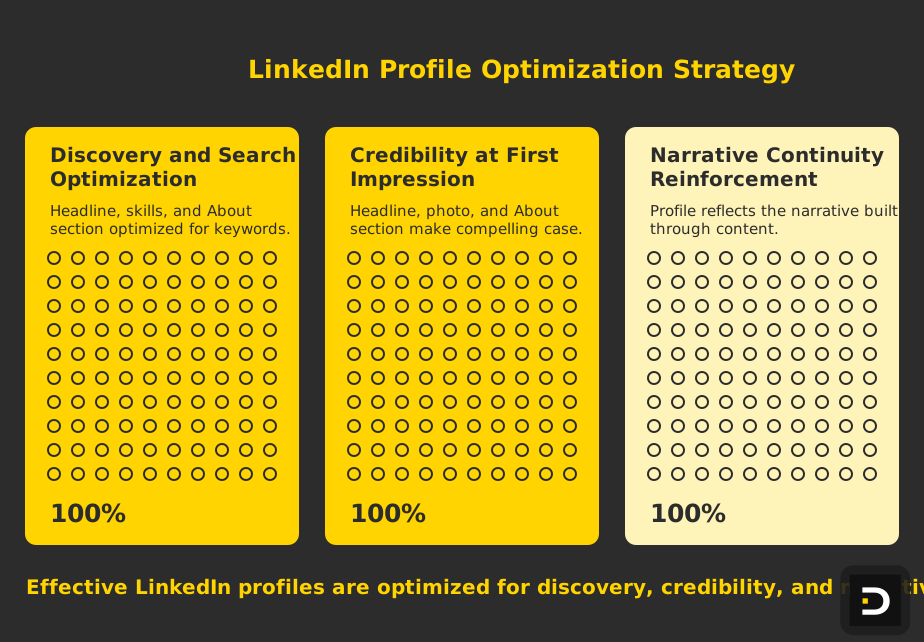
Second: Credibility at first impression. Someone lands on your profile for the first time. They have 10 seconds to decide whether you're worth following or connecting with. Your headline, photo, and the first 100 characters of your About section need to make a compelling case immediately.
Third: Narrative continuity. Your profile should reinforce the narrative you're building through your content. If you're positioning yourself as "the founder focused on category education," your profile should reflect that. If you're positioning as "technical founder who's built three companies," that narrative should be visible.
Most CEO profiles fail on all three counts. They're not optimized for search. They don't make an immediate credible impression. And they don't reinforce your content narrative.
The optimization process fixes all three by being intentional about every field.
Headline Optimization: Beyond Your Job Title
Your headline is the single most important field on your profile. It's what shows up next to your name everywhere—search results, comment sections, notification feeds. Most CEOs waste it.
The broken approach: Using your job title. "CEO and Founder at [Company Name]"
This is accurate but useless. Everyone knows you're the CEO. It doesn't say anything about why someone should care or what you're known for.
The optimized approach: Include your job title + what you do / believe / stand for + who you serve.
Structure: [Title] | [What you do/believe] | [Who you serve/serve]
Character limit: 220 characters. This gives you room for a compelling headline without truncation on most devices.
Examples of optimized headlines:
"CEO, Membrane | Building the modern API infrastructure for fintech | Founder obsessed with developer experience"
This headline tells you: her role, what company is doing, and her philosophy. If you search "API infrastructure fintech," you might find her. If you search "developer experience," you might find her. And from 10 seconds of reading, you know what she cares about.
"Founder & CEO, Copperhelm | Protecting healthcare data | Cryptography + compliance nerd"
This tells you: his role, the problem he solves, his personality/expertise. It's searchable for "healthcare data protection." It's compelling because "cryptography nerd" creates personality and distinction.
"CEO, Reco | Building security for the hybrid workplace | Forbes 30U30 | Keynote speaker on CISO trends"
This title includes role, problem, social proof (Forbes 30U30), and a relevant credential. If someone searches "hybrid workplace security," you show up.
Headline optimization rules:
Include your job title in the first part of the headline (CEO, Founder, Founder & CEO). LinkedIn's algorithm gives weight to recognized titles.
Include one relevant keyword that describes your domain. "API infrastructure," "healthcare data," "hybrid workplace security." This is what people search for.
Include something distinctive about you or your company. "Founder obsessed with developer experience" is more compelling than "building great software." "Nerd" and "Forbes 30U30" add personality and credibility.
Keep it under 220 characters to avoid truncation. Test on mobile—see where it cuts off.
Avoid generic phrases like "Passionate about innovation" or "Driven entrepreneur." These don't help discovery and don't distinguish you.
Use the pipe symbol (|) to create visual separation between sections. It makes longer headlines more scannable.
About Section: Narrative Over Biography
Your About section is your pitch. It's where you answer the question: "Why should I pay attention to you?" Most CEOs answer this like they're filling out a job application. They list credentials and experience.
Instead, tell a story. Make an argument. Establish why you matter.
The structure that works:
Paragraph 1: The hook (1–2 sentences)
What's the problem you care about? What's the big opportunity? This is your opening line—it should stop someone from scrolling.
"I'm convinced that the security industry has been solving the wrong problem. We've been building walls. I'm building visibility."
Or: "Most founders take 3+ years to find product-market fit. I think we can do it in 6 months. Here's why."
This paragraph is your argument. It's not "I'm the CEO of X." It's "I believe Y and I'm building toward Z."
Paragraph 2: Your credibility (2–3 sentences)
Why should anyone believe you? What's your experience, insight, or edge? This is where you mention relevant background without making it a résumé.
"I spent 5 years as a CISO at healthcare companies, which showed me exactly how broken enterprise security tooling is. I've also sold to 50+ CISOs, which taught me how to build technology they actually want to buy."
Or: "Built and exited two companies. First one failed. Learned everything from it. This is attempt three."
This paragraph builds trust by establishing why you have insight into this problem.
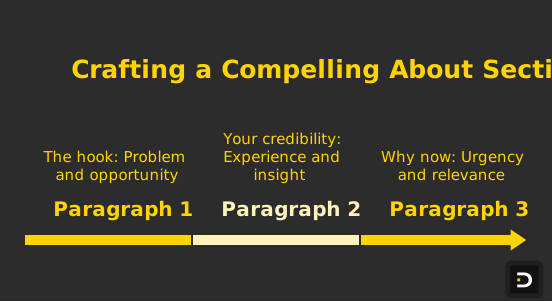
Paragraph 3: Why now (1–2 sentences)
What's changing in the market that makes this the right moment? What's your thesis about the future? This adds conviction and context.
"The shift to hybrid work makes the old perimeter-based security model obsolete. The companies that solve for visibility in hybrid environments will own the next decade of enterprise security."
Paragraph 4: Call to action (1 sentence)
What do you want people to do? This depends on your goals.
"If you're thinking about the future of API infrastructure, happy to share my thoughts. Drop me a note."
Or: "Hiring engineers. If you've solved infrastructure problems at scale, let's talk."
Or: "Write about security, startups, and the future of work. Follow along."
This gives people a reason to engage.
Full About section example:
"I'm convinced most companies are building security the wrong way. They're focused on compliance instead of detection. I'm changing that with Membrane.
I spent 8 years as a CISO and worked with 100+ enterprise customers. I learned exactly what security tools actually need to do to win in the market.
The shift to cloud-native infrastructure means the traditional security model is broken. Companies that rebuild for cloud-first security will own the next decade.
If you think about security architecture or want to talk about where the market is going, happy to connect. Building a strong team—if you've solved detection problems at scale, reach out."
About section best practices:
Keep it 150–250 words. Long enough to establish credibility and narrative. Short enough that people read it.
Front-load your value. The first sentence is the most critical. Make it compelling or people stop reading.
Use 3–4 short paragraphs instead of one long block of text. Paragraphs are more readable on mobile, where most LinkedIn browsing happens.
Include 2–3 keywords that describe your domain or expertise. LinkedIn's search indexes the About section, so including "security," "API infrastructure," or "healthcare" helps you show up in relevant searches.
Link to your company or main project early in the About section. Use the {website} feature or include a direct link.
Don't use this space for a résumé. People can read your experience section. Use the About section to establish narrative and personality.
Featured Content: Your Best Work
Your featured section is real estate at the top of your profile. It shows up immediately after your About section and it's where you curate your best work.
Most CEO profiles don't use the featured section at all. They leave this valuable space blank.
What to feature:
Your 3–5 best performing posts. These should be posts that got high engagement (200+ comments, lots of shares) or posts that best represent your core narrative. If you want to be known as a thought leader in API security, feature your best posts about API architecture and security.
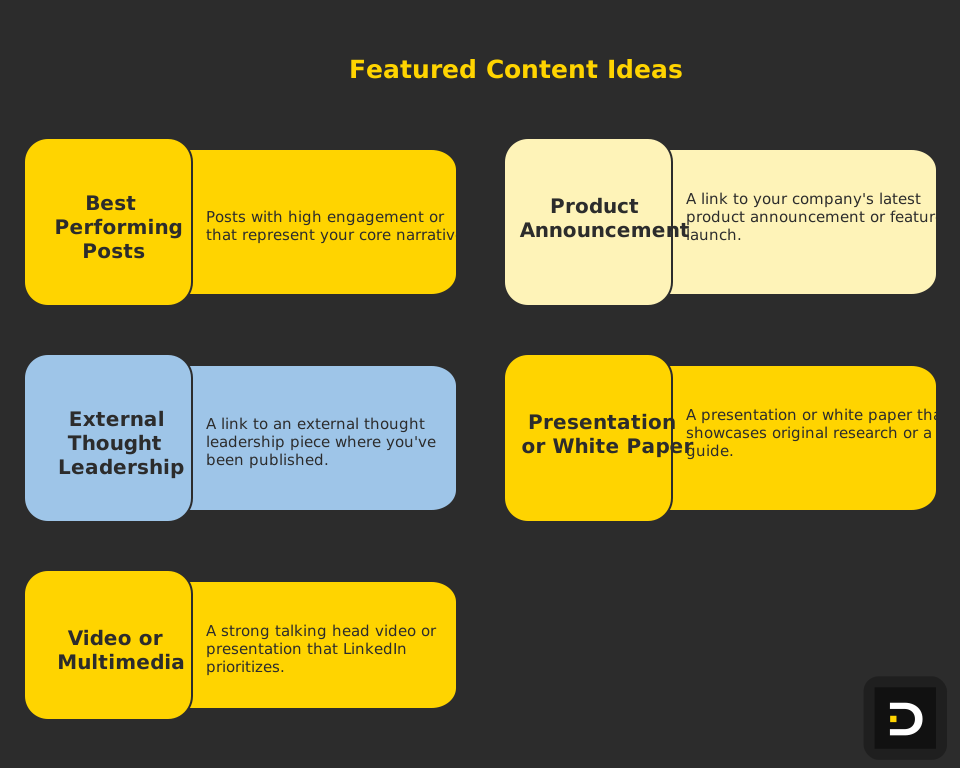
A link to your company's latest product announcement or feature launch. This keeps your profile current and directs people toward your business.
A link to an external thought leadership piece. If you've been published on TechCrunch, Forbes, or industry publications, feature that here. It adds credibility.
A presentation or white paper. If you've created original research or a guide, feature it. This positions you as someone who shares knowledge, not just commentary.
A video or multimedia content. LinkedIn prioritizes video, so if you have a strong talking head video or presentation, feature it.
How to add featured content:
Go to your profile's Featured section. Click "Add" and choose the type of content (post, link, media, document). You can drag to reorder. Keep your best performing or most important piece at the top.
Update quarterly. Remove underperforming featured items and replace them with newer, better-performing content.
Experience, Education, and Skills Sections
These sections are straightforward but easy to get wrong.
Experience section:
List your current and past roles. Include specific responsibilities and outcomes, not just job titles. Instead of "VP Sales," write "VP Sales | Built sales team from 2 to 15 people | Grew ARR from $1M to $10M."
Include current company logo and description. Make sure your company description is up to date. This is a good time to make sure the company information is accurate.
Link previous roles. If you've started multiple companies, make sure people understand the timeline and what you did at each role.
Education section:
List degree and school. You can add details like GPA, honors, or relevant coursework if you just graduated, but skip it if you're more than 5 years out. Most people don't care that you got an A in Computer Science 101.
Add non-traditional education. Online courses, certifications, bootcamps. If you learned something valuable outside traditional education, include it.
Skills section:
Add 10–20 relevant skills. These are what LinkedIn uses for search recommendations and endorsements. Include: domain expertise (e.g., "API Architecture," "Security," "Cloud Infrastructure"), tools and frameworks (e.g., "Kubernetes," "PostgreSQL," "React"), soft skills (e.g., "Leadership," "Product Strategy," "B2B Sales"), and industry expertise (e.g., "SaaS," "Enterprise," "Fintech").
Order matters. Put your most relevant/differentiated skills first. If you're known for security, put "Cloud Security" or "Zero Trust Architecture" in the top spot, not "Communication Skills."
Let LinkedIn suggest endorsements, then remove irrelevant ones. People will endorse you for things you haven't done. Clean this up occasionally.
Recommendations and Endorsements
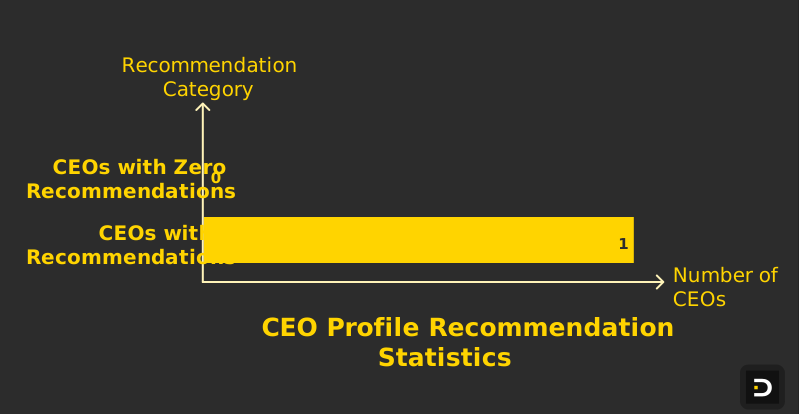
Recommendations are powerful social proof. Most CEO profiles have zero recommendations, which is a missed opportunity.
How to get recommendations:
Write specific recommendations for others first. You set the tone and example. When you recommend someone thoughtfully (not just "great person!" but specific examples and impact), they're more likely to reciprocate.
Ask for them directly. Reach out to former teammates, employees, investors, customers: "Would you be willing to write a recommendation about [specific aspect of what we worked on together]? I'm focused on building credibility around [specific expertise]."
When someone recommends you, thank them and consider recommending them back.
What good recommendations look like:
"Specific accomplishment, not generic praise. 'Built the sales team from scratch and hit $5M ARR in year one' beats 'great sales leader.'"
Evidence of impact. "Reduced customer churn from 40% to 8% by implementing this process" is stronger than "cares about retention."
Personal insight. "She's the only founder I've worked with who asks ten questions before giving one opinion" is more memorable than "thoughtful leader."
Request 5–8 recommendations from different people (investors, employees, customers, co-founders, business partners). Variety adds credibility.
Keep them current. If a recommendation is several years old, it matters less. Occasionally request new recommendations from people you've worked with recently.
Keyword Strategy and Search Optimization
LinkedIn's search algorithm is complex, but there are clear patterns in what gets indexed and ranked.
Keywords LinkedIn indexes:
Headline (weighted heavily)
About section
Experience and job titles
Skills (weighted moderately)
Education
Company and industry
Recommendations text
Posts you've published
Keyword placement strategy:
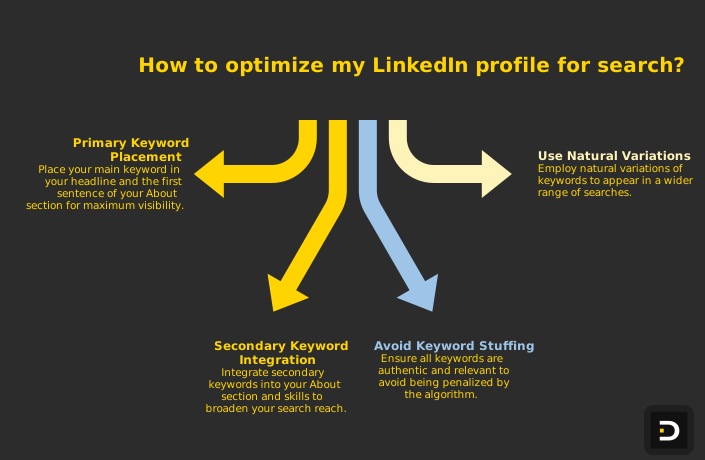
Your primary keyword (what you most want to be found for) should appear in your headline and first sentence of your About section. If you want to be found for "healthcare API security," that phrase should be in your headline.
Secondary keywords should appear in your About section and skills. "Cloud infrastructure," "zero trust," "HIPAA compliance" should all appear somewhere on your profile if they're relevant to you.
Don't keyword stuff. Never add keywords just for search. Everything on your profile should be authentic and relevant. Over-optimization looks weird and doesn't actually help—LinkedIn's algorithm is smart enough to detect keyword stuffing and deprioritizes profiles that do it.
Use natural variations. You don't need the exact phrase "API security" ten times. "API infrastructure," "API architecture," "security," "zero trust," etc., all help you show up for related searches.
Before/After Profile Examples
Example 1: Series A Fintech CEO
BEFORE:
Headline: "CEO and Founder at Paycade"
About: "I'm the CEO and founder of Paycade. We're building payment infrastructure for SMBs. I've worked in fintech for 10 years. I'm passionate about innovation and improving payment experiences. I'm based in San Francisco and love coffee."
Featured content: Empty
Skills: Fintech, Payments, Leadership, Entrepreneurship, Strategy
AFTER:
Headline: "CEO, Paycade | Rebuilding payment infrastructure for SMBs | 10 years in fintech, 0 patience for legacy"
About: "Most SMBs are stuck with payment infrastructure from 2005. I'm convinced we can do better. At Paycade, we're building payment systems that actually work for businesses under $10M in revenue.
I spent 8 years building payment systems at Stripe, which taught me both what works and what the market is willing to pay for. I've also watched 50+ SMBs struggle with the same payment problems.
The shift to cloud payments and API-first infrastructure means legacy payment systems are dying. The companies that rebuild payment experiences for modern businesses will own the next decade.
If you're thinking about SMB fintech, payment strategy, or want to talk about where the market is going, let's connect."
Featured content: - Top performing post: "Why PayPal Terrifies Traditional Banking" - Link to Paycade product launch: "We just raised $5M Series A" - Forbes piece: "The Future of SMB Payments"
Skills: Payment Infrastructure, SMB Fintech, Payment Systems Architecture, API Design, Stripe (former), Zero Trust Security, Cloud Infrastructure, Product Strategy
The difference: The before profile says "I work at X." The after profile says "Here's the problem, here's why I understand it, here's why now matters, here's what I'm building." The before profile is hidden from search. The after profile shows up for "SMB payment infrastructure," "fintech," "payment systems," and 20+ other relevant searches.
Example 2: Early-Stage Cybersecurity CEO
BEFORE:
Headline: "Founder & CEO"
About: "Cybersecurity entrepreneur. Building a company to protect data. Experienced in enterprise security. Available to speak at conferences."
Featured content: Empty
Skills: Security, Cybersecurity, Leadership, Startups
AFTER:
Headline: "Founder & CEO, Threatnation | Detections that actually work | Former CISO + security engineer"
About: "Enterprise security today is broken. You have a dozen tools. None of them talk to each other. Security teams are drowning in false positives. I'm building a better way.
I spent 6 years as a CISO at two Fortune 500 companies. I saw every major breach firsthand. I watched security teams implement tool after tool while attackers just got smarter. I decided to build the detection system I always wanted to use as a CISO.
The market is waking up to the fact that traditional detection doesn't scale. Companies like Google, Amazon, and Netflix have proved that ML-driven detection works. Enterprise security needs to catch up.
If you're a CISO thinking about how to modernize detection, or if you're building detection infrastructure, I'm always open to conversation. Also hiring senior engineers who understand at-scale detection problems."
Featured content: - "Why Your SOC is Broken (And How to Fix It)" — blog post - "I saw a $10M breach happen in real time. Here's what I learned." — LinkedIn video - "Building Detection Systems that Don't Create Alert Fatigue" — whitepaper
Skills: Enterprise Security, Threat Detection, SOC Operations, ML in Security, CISO Advisory, Security Engineering, Zero Trust, Kubernetes Security
The difference: The before profile is generic. The after profile establishes credibility (CISO experience), defines the problem (detection doesn't work), explains why (broken tools, false positives), positions the solution (ML-driven detection), and includes a clear CTA (hiring, conversation). It's also findable for "enterprise security," "threat detection," "CISO," and "SOC operations."
Frequently Asked Questions
How often should I update my profile?
Update your headline and About section whenever your company or role changes significantly. Update your featured content quarterly (add new content, remove underperforming pieces). Update your skills and recommendations as you develop new expertise. Keep the overall narrative current—if you wrote your About section two years ago and your company has evolved, update it.
Should I put my fundraising status in my profile?
You can mention it in context of your narrative, but don't lead with it. "Building Threatnation after raising Series A" is fine. "Fundraising for Series B" in your headline is less compelling. Your headline should be about what you're building and why you matter, not your current fundraising stage.
Is a professional headshot essential?
Yes. Use a high-quality, professional headshot. You don't need a corporate studio photo, but you need something better than a selfie. Your photo is the first thing people see—invest in making it good. Ideally: clean background, clear face, natural lighting, and you looking at the camera. Update your photo every 1–2 years.
How do I optimize for different keywords without sounding spammy?
Use keywords naturally in context. Your headline, About, and skills should all reflect your actual expertise and market positioning. Don't add "Blockchain," "AI," or "Crypto" to your skills unless you actually work in those areas. LinkedIn's algorithm catches keyword stuffing.
Should my profile be more personal or professional?
Balanced. You want credibility and expertise (professional), but you also want personality and humanity (personal). A founder is not a corporation. Your profile should reflect you as a person with distinctive opinions, experience, and voice. The best CEO profiles feel like you're meeting a real person, not reading a corporate bio.
Can I change my headline frequently?
You can, but don't change it weekly. LinkedIn's algorithm notices stability in your profile data. Update your headline when your company or role changes significantly, or when you're intentionally shifting your personal brand positioning. Changing it every week looks like you're unsure of your positioning.
Ready to Build Your LinkedIn Thought Leadership?
Your LinkedIn profile is your professional front door. A poorly optimized profile sends visitors away. A well-optimized profile makes them want to know more.
Spend 2–4 hours optimizing each element: headline, About section, featured content, skills, recommendations. Make sure every field answers the question: "Why should I care about this person?" If a field doesn't contribute to answering that question, simplify or remove it.
Then use that profile as the foundation for your content strategy. When your profile is compelling, people who discover your content through your posts or through search are more likely to follow you. When your featured content is strong, people who land on your profile stay longer and engage more deeply.
For a complete content strategy that leverages a great profile, check out executive-linkedin-content-strategy-2026 or explore how to linkedin-ghostwriting-for-founders to manage the ongoing narrative.
Your profile is the foundation. Build it right.