LinkedIn Automation Tools: What's Safe, What Gets You Banned
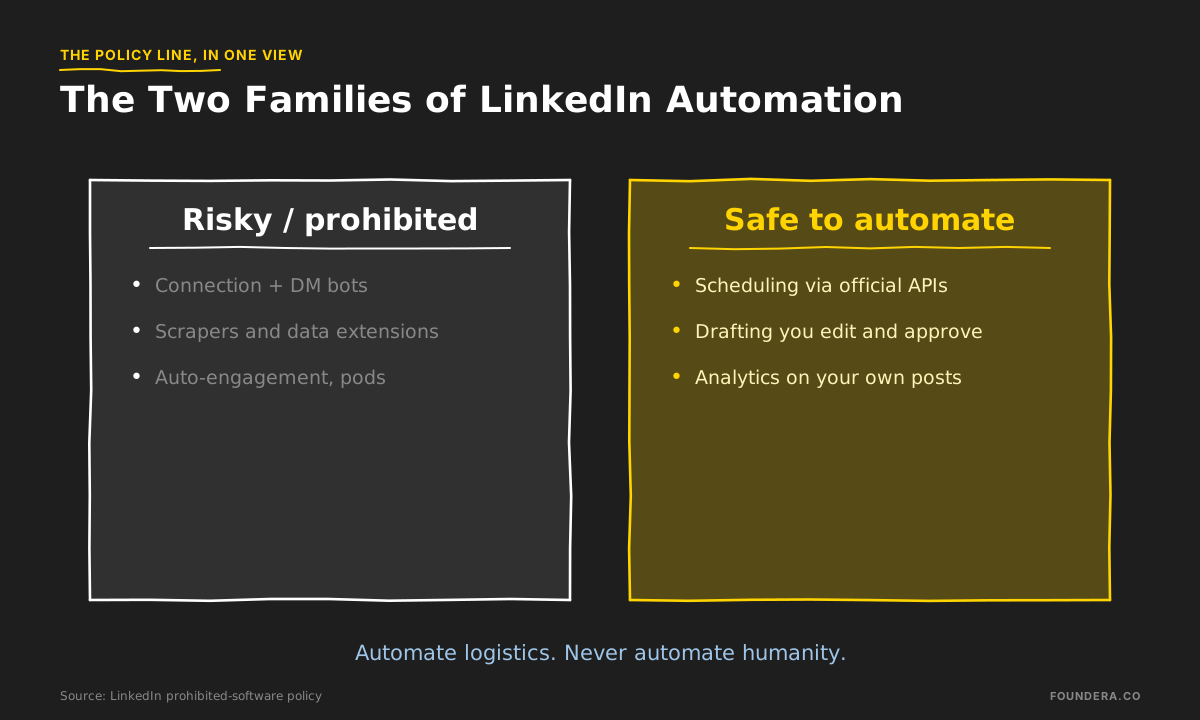
LinkedIn automation tools split into two families, and the platform treats them very differently. Tools that automate logistics — scheduling, analytics, AI-assisted drafting — are safe. Tools that automate humanity — connection bots, scrapers, auto-engagement — are explicitly prohibited: LinkedIn "does not permit the use of any third party software, including 'crawlers', bots, browser plug-ins, or browser extensions that scrape, modify the appearance of, or automate activity on LinkedIn's website," and warns that members using them "risk having their accounts restricted or shut down" (LinkedIn Help: prohibited software and extensions). That's not a theoretical threat. In April 2025, LinkedIn enforced at scale — even Taplio's own company page was restricted during the wave, per Supergrow's account of the crackdown.
This is the founder's guide to that line: what the policy actually says, which tools live on which side, what the whole market costs in 2026, and why — even setting the rules aside — botted activity buys a currency the algorithm stopped accepting.
Table of Contents
- LinkedIn's Official Policy on Automation
- What Automates Safely
- What Risks Your Account
- The Founder's Tool Roundup
- Why Bots Can't Buy Reach Anymore
- Where Automation Ends and Voice Begins
- Frequently Asked Questions
LinkedIn's Official Policy on Automation
The policy language is unusually blunt for platform legalese. Beyond banning crawlers, bots, and scraping extensions, the same page prohibits fake accounts, fake engagement, and tools that manipulate content algorithms — and notes that prohibited tools may simply stop working without notice.
For years the policy sat mostly unenforced, and an entire industry grew inside the gap. Then the gap closed:
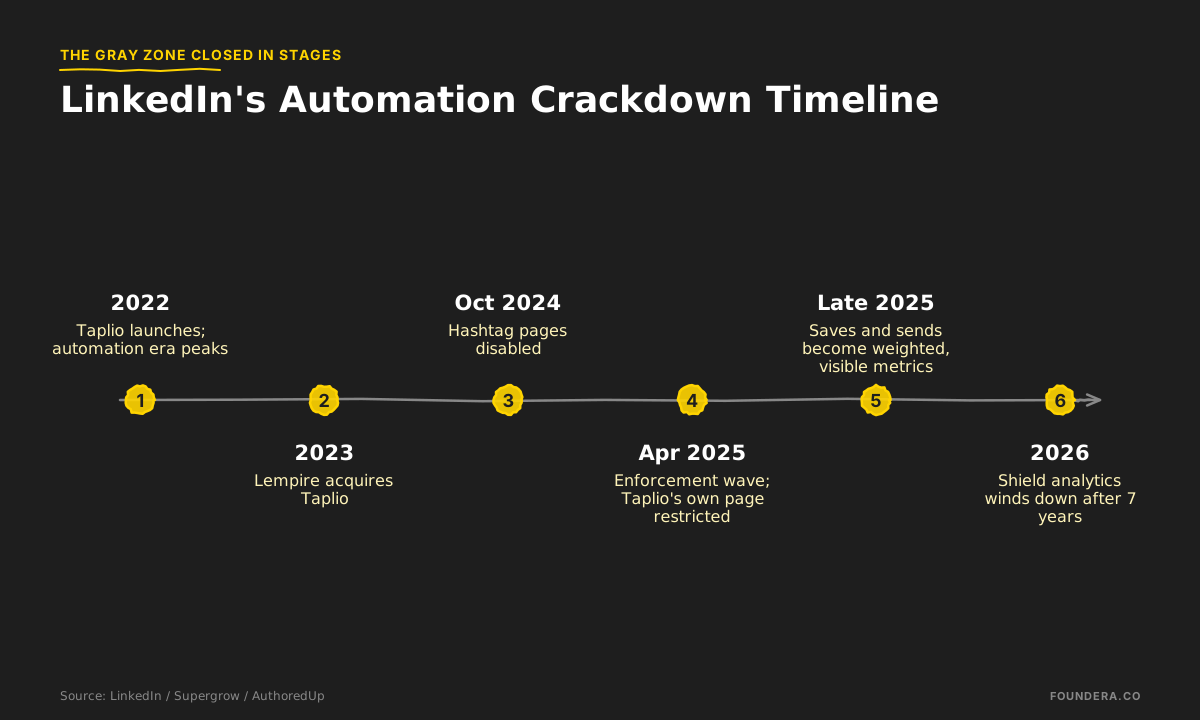
The April 2025 wave is the event that reset the category. LinkedIn moved against third-party automation tools at scale; Taplio's own company page was restricted during the enforcement, and users of automation features reported shadow-bans and temporary suspensions in the aftermath. Vendors responded by stripping or hiding automation features — and the tools that survived cleanly were the ones that never touched the action stream in the first place.
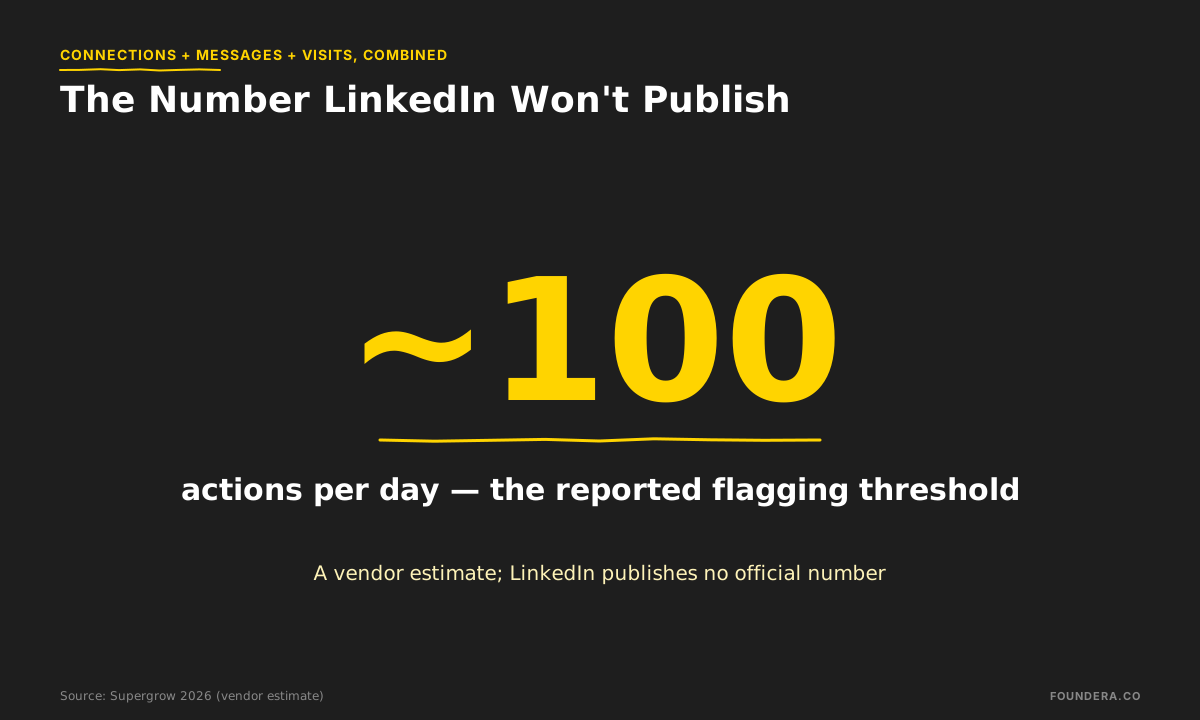
One number founders ask about constantly: the flagging threshold. The commonly cited figure is around 100 actions per day — connection requests, messages, profile visits combined — beyond which accounts get flagged. Know what that number is: a vendor-reported estimate from Supergrow's review, not an official LinkedIn figure. LinkedIn publishes no threshold, which is itself the point — the safe number is a moving target you don't control.
What Automates Safely
Three categories of LinkedIn automation tools operate outside the action stream, which is why they're safe: they never perform activity as you.
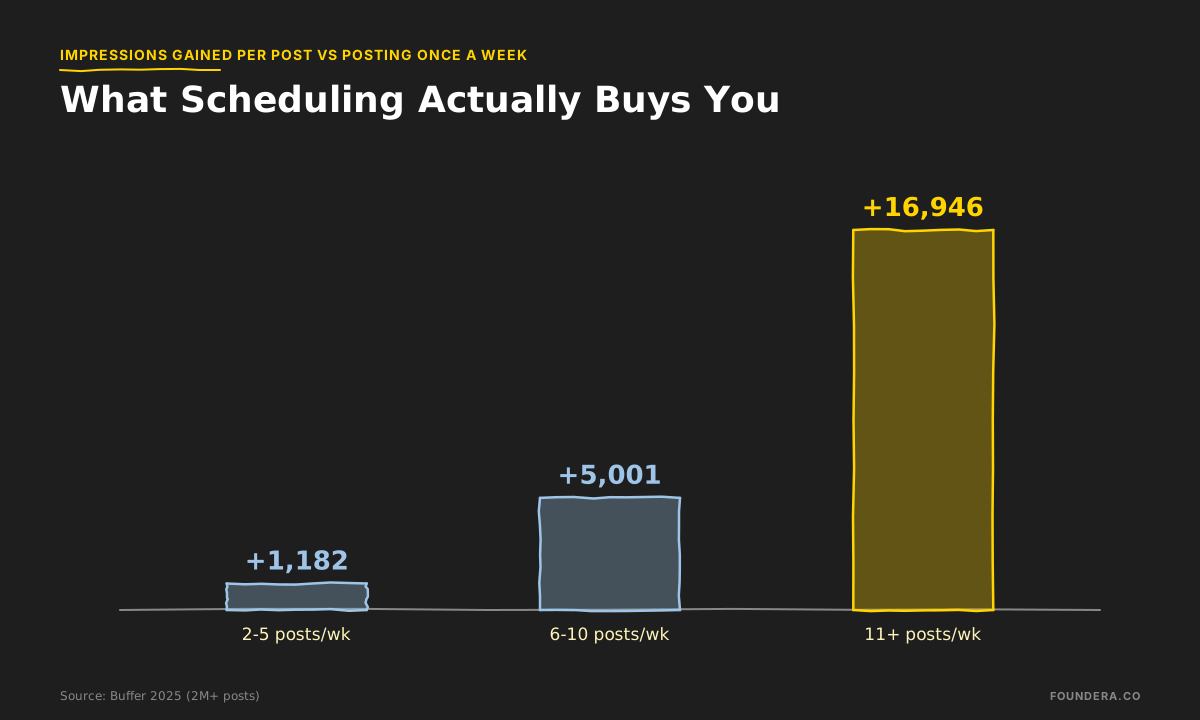
Scheduling. Publishing a post you wrote, at a time you chose, through an official API is not "automating activity" in the policy's sense — and LinkedIn's own native scheduler does the same job for free. The reason scheduling matters is volume economics: Buffer's study of 2M+ posts across 94K+ accounts found that posting 2-5 times per week instead of once adds +1,182 impressions per post, 6-10 times adds +5,001, and 11+ adds +16,946 — we unpacked the full dataset in our Taplio alternatives guide. Nobody sustains 2-5 posts a week by posting live; scheduling is how consistency survives a founder's calendar.
Drafting. AI-assisted writing happens entirely off-platform: the tool suggests, you edit, you approve, you post. No policy issue — though there's a quality issue we'll get to in the last section, because "safe" and "worth publishing" are different bars.
Analytics. Reading your own performance data breaks nothing. The category note for 2026: Shield, the dedicated LinkedIn analytics tool, wound down this year after seven years, and its benchmark-style data isn't sold separately anywhere since — AuthoredUp at $19.95/mo has effectively inherited the role.
What Risks Your Account
The other family performs actions on your behalf, which is precisely what the policy names.
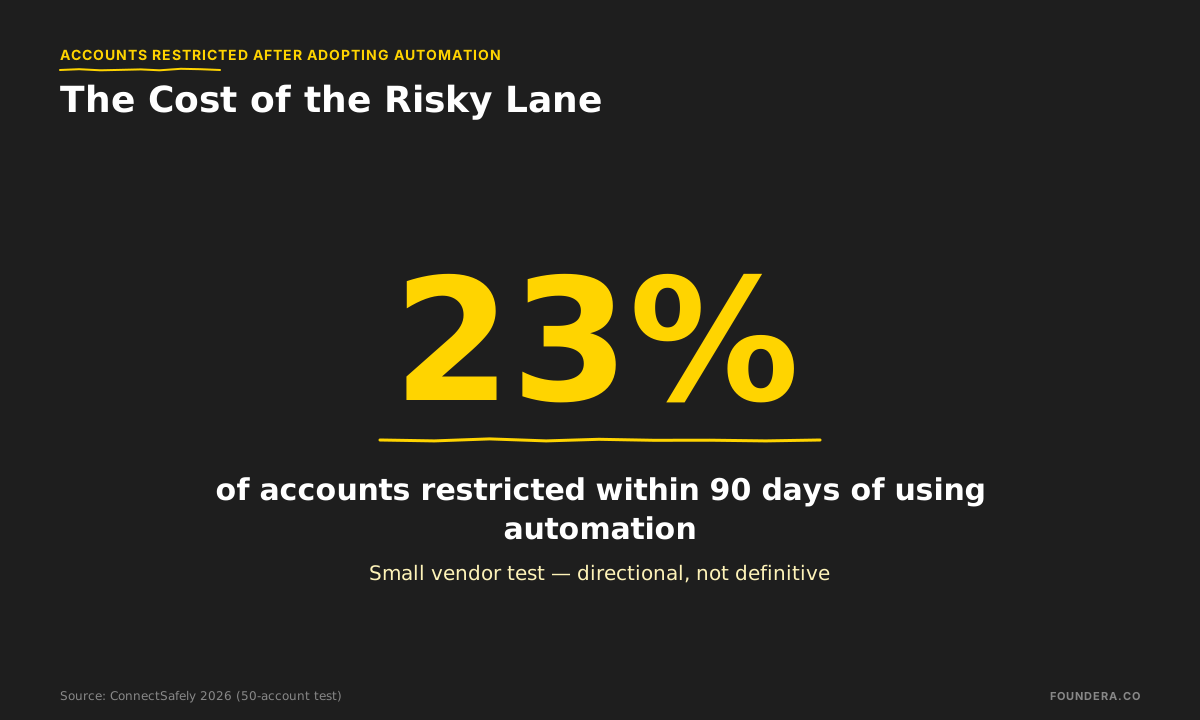
Connection and DM bots. Automated invites and message sequences are the policy's core target and the April 2025 wave's main casualty. The risk data we have is thin but directional: one vendor test across 50 accounts found a 23% restriction rate within 90 days of using automation — a small, low-rigor sample, so treat it as a warning sign rather than a precise probability. The direction, though, matches everything since April 2025.
Scrapers and data extensions. The policy names "crawlers" and "browser extensions that scrape" explicitly. This bucket is bigger than founders think: any Chrome extension that extracts profile data or modifies how LinkedIn renders is technically inside it, including polite-looking prospecting helpers.
Fake engagement — pods and auto-likers. Fake engagement is named in the policy alongside fake accounts. It's also economically obsolete, for reasons the next section quantifies — we've run the full comparison in engagement pods vs organic growth.
A note on done-for-you outreach services. Agencies that run outreach campaigns from your profile (Cleverly and its peers, from $397/mo) occupy a gray zone: human-plus-software activity at volumes you don't control, on an account you own. Whatever the vendor's assurances, the restriction risk lands on you. We covered that market — and when outreach is even the right purchase — in our Cleverly alternatives guide.
The Founder's Tool Roundup
The 2026 market, by category and entry price. Tool prices are from Taplio's own published comparison; the full tool-by-tool teardown is in our Taplio alternatives guide.
| Category | Tool | 2026 entry price | Policy posture |
|---|---|---|---|
| Scheduling | Buffer | Free, then $5/channel/mo | Safe — official API |
| Scheduling (teams) | Hootsuite | $99/user/mo (annual) | Safe — official API |
| Drafting + scheduling | Supergrow | $19/mo | Safe on the content side |
| Drafting + analytics | AuthoredUp | $19.95/mo | Safe |
| AI drafting | MagicPost | $21/mo | Safe |
| All-in-one | Taplio | $39/mo (AI from $69) | Content features safe; automation features drew the April 2025 enforcement |
| Creator research | Kleo | $99/mo | Browser extension — check it against LinkedIn's extension policy |
| Done-for-you outreach | Cleverly | $397+/mo | Gray zone — runs on your profile |
| Done-for-you content engine | Foundera | $4,000/mo | Human-made; nothing robotic touches your account |
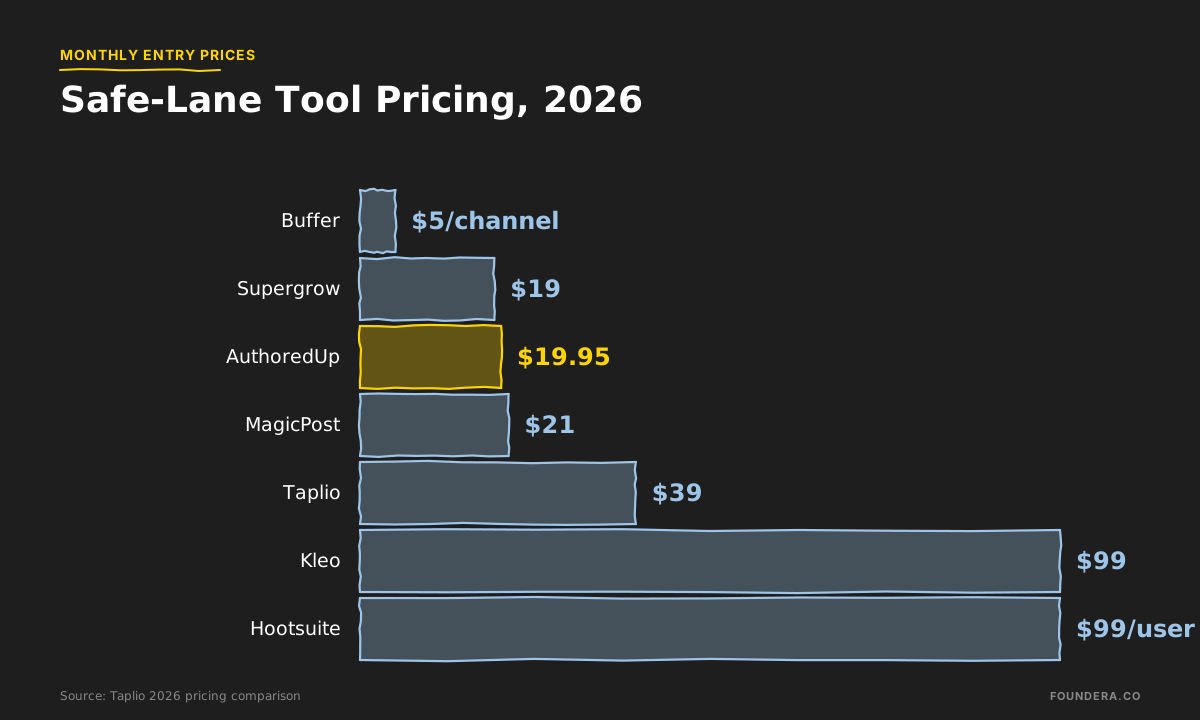
The pattern in that table: price tracks how much human judgment is included, not how much software. The $19-99 rows automate logistics around your judgment. The bottom rows replace your hours with other humans' hours. Nothing in between — no $200 bot — replaces judgment with code and survives 2026 LinkedIn.
Why Bots Can't Buy Reach Anymore
Set the policy aside entirely. The deeper reason automation-heavy strategies stopped working is that the algorithm changed what it pays for.
The backdrop is brutal: average reach fell 34% in 2025, and reach is down year-over-year for 98% of users, per AuthoredUp's analysis of 621,833 posts. Distribution now runs in three stages — an initial classification in the first hour, an engagement test at hours 1-2, then extended distribution — and the metrics that decide it are the ones bots can't fake:
- Comments count roughly 2x likes in the testing stage, with dwell time also weighed.
- 1 save gives a post 5x the reach of 1 like, and a saver is 130% more likely to follow you. Saves and sends became visible, weighted metrics in late 2025.
- Real discussion multiplies reach: posts whose comment sections contain replies-to-replies see up to 2.4x more reach than regular posts.
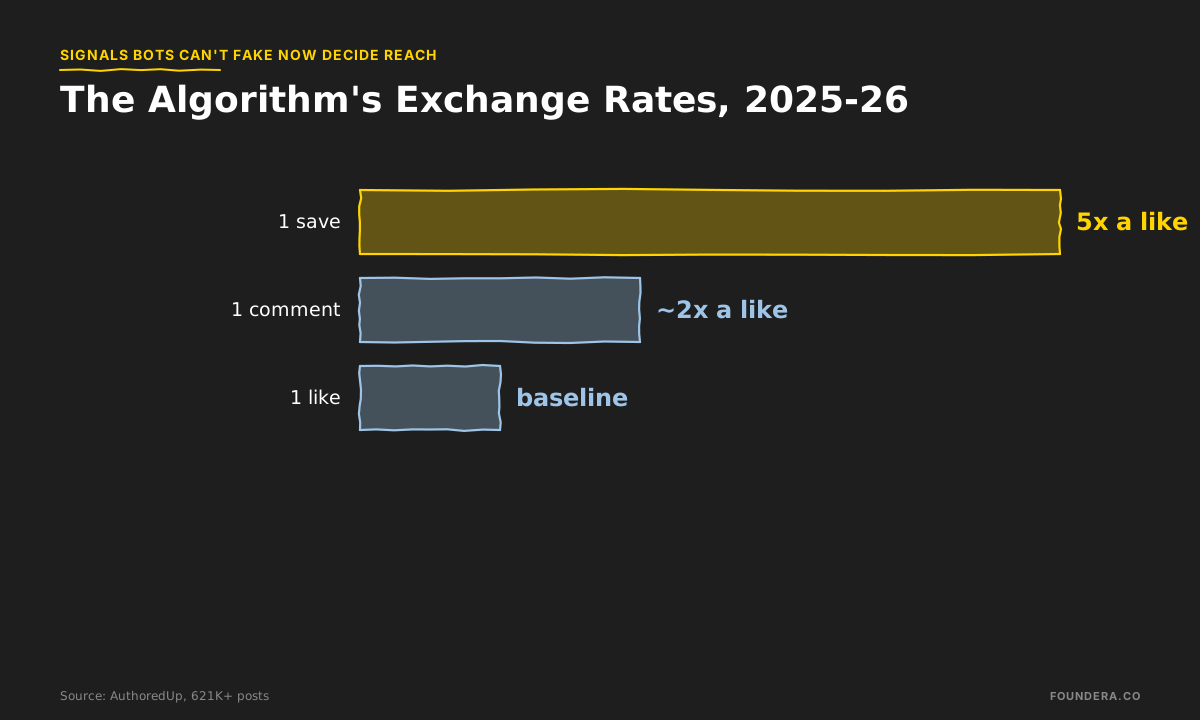
Look at what those three signals have in common: each one requires a human to find your post genuinely worth keeping, discussing, or sending to a colleague. A like-bot or a pod can inflate exactly one metric — the one the algorithm now values least. The 2026 meta is almost poetic: LinkedIn made the cheap signals worthless and the expensive signals decisive, and the expensive signals can only be earned by writing things practitioners want to save.
That's why "which LinkedIn automation tools should I buy" is the wrong first question. Reach isn't gated on tooling. It's gated on whether your content clears the save-worthiness bar — which is a strategy and voice problem. Our framework for that layer is in LinkedIn content strategy for founder-led growth.
Where Automation Ends and Voice Begins
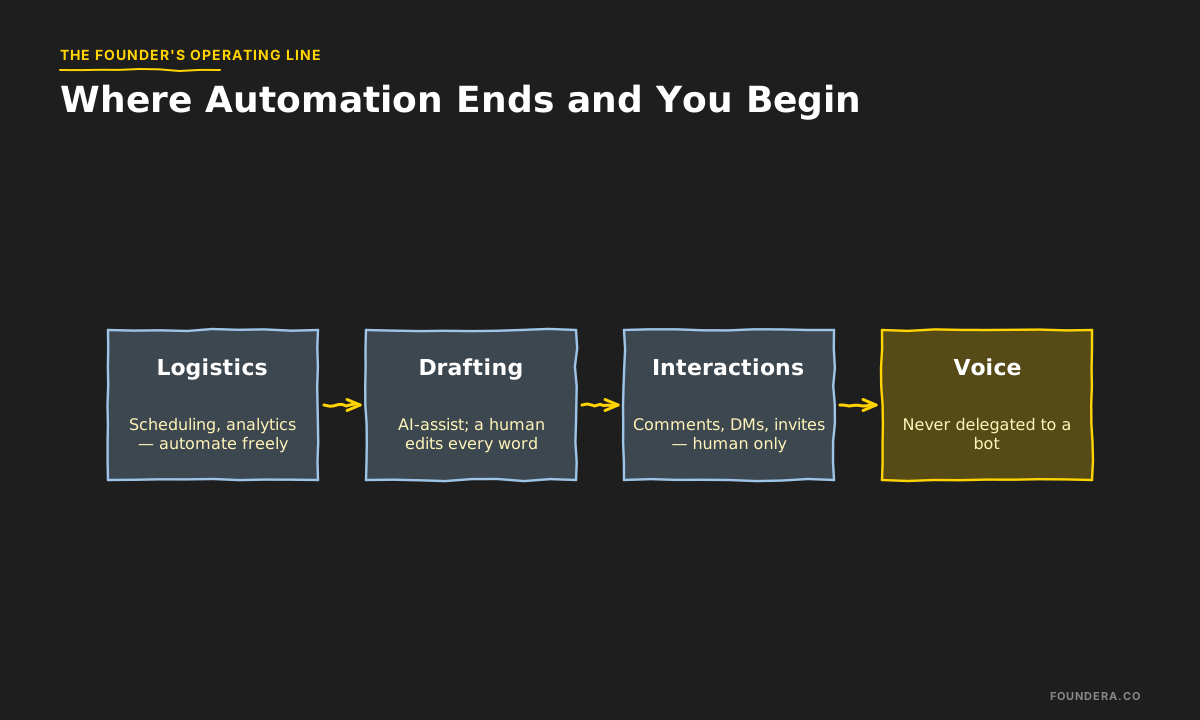
Here's the line we run internally, and it holds for every founder we've seen do this well:
Automate everything that doesn't touch another human. Never automate anything that does.
Scheduling, analytics, formatting, research — automate freely. Drafting — AI-assist if you like, but a human edits every word that ships under your name, because your voice is the entire asset. Interactions — comments, DMs, connection requests — human only, no exceptions: these are conversations with future customers, hires, and investors, and outsourcing them to a bot is detectable by both the algorithm and the human on the other end. The practical division of labor between AI and founder is one we've mapped step-by-step in the AI-assisted founder content workflow.
Full disclosure on where we sit: Foundera is a done-for-you content engine at $4,000/mo — human strategists, writers, and a monthly 3-camera video shoot, at about 2 hours of founder time per month. We automate plenty of logistics internally. Nothing robotic ever acts on a client's account, because the entire product is the founder's authentic voice at scale — and that's the one thing on this page no software has ever produced.
Frequently Asked Questions
Are LinkedIn automation tools against the rules?
Tools that automate activity — connecting, messaging, engaging, scraping — violate LinkedIn's prohibited-software policy and carry the stated risk of accounts being "restricted or shut down." Tools that automate logistics — scheduling posts you wrote, analytics, off-platform drafting — don't perform activity as you and are safe.
What are the best LinkedIn tools for founders?
By category, at 2026 prices: scheduling — Buffer (free, then $5/channel/mo) or LinkedIn's free native scheduler; drafting and analytics — AuthoredUp ($19.95/mo) or Supergrow ($19/mo); all-in-one — Taplio ($39/mo, AI writing from $69); done-for-you — outreach from $397/mo (Cleverly), full content engines around $4,000/mo (Foundera). Match the category to your bottleneck, not the feature list.
How many LinkedIn actions per day are safe?
There is no official number. The commonly cited ~100 actions/day threshold is a vendor estimate, and tools without daily limits can push you past it without warning. The durable answer: keep interaction volumes at levels a human would plausibly do by hand, because LinkedIn adjusts the ceiling without telling anyone.
Will scheduling posts hurt my reach?
No policy issue and no penalty evidence — Buffer's 2M-post dataset is built almost entirely on scheduled posts and still shows the frequency lift (+1,182 to +16,946 impressions per post). What decides reach is what happens after publishing: comments weigh ~2x likes in the first hours and saves weigh 5x, so the quality of the post matters far more than how it was queued.
Are engagement pods a form of prohibited automation?
Fake engagement is named in the policy itself, whether it's coordinated by software or by a WhatsApp group. It's also strategically dead: pods inflate likes, and the algorithm now pays out on saves, sends, dwell time, and real discussion — none of which a pod can fake. The full breakdown: engagement pods vs organic growth.
What happened in the April 2025 LinkedIn crackdown?
LinkedIn enforced its prohibited-software policy at scale against third-party automation tools. Taplio's own company page was restricted during the wave, users of automation features reported shadow-bans and temporary suspensions, and the surviving vendors repositioned around content features. It's the clearest signal yet that the automation gray zone is closed.
TL;DR
- LinkedIn's policy bans bots, scrapers, and activity automation outright — accounts "risk being restricted or shut down" (LinkedIn Help). April 2025 proved enforcement is real: even Taplio's page was restricted (Supergrow).
- Safe to automate: scheduling, analytics, AI-assisted drafting you edit. Risky: connection bots, scrapers, auto-engagement, pods — one small test saw 23% of accounts restricted within 90 days.
- The reported flagging threshold is ~100 actions/day, but it's a vendor estimate — LinkedIn publishes no number.
- 2026 tool prices: Buffer $5/channel, Supergrow $19, AuthoredUp $19.95, Taplio $39 (AI from $69), Kleo $99; done-for-you runs $397/mo (outreach) to $4,000/mo (full content engine).
- Bots buy the wrong currency anyway: reach fell 34% in 2025, and the algorithm now pays on saves (5x a like), comments (~2x), and real discussion (2.4x reach) — signals only genuinely useful content earns (AuthoredUp).
- The line: automate logistics, never humanity. Your voice is the asset — the moment a bot speaks as you, you're spending trust to save time.